
Instead of manually searching for an ACCUPLACER score report to College Board upload form, retrieve your report through the ACCUPLACER student portal and confirm your college’s submission rules. This 2026 workflow separates score retrieval, college placement review, and test-day preparation so you complete the right task without sending a report to the wrong destination.
- An accuplacer score report to college board upload is unnecessary; retrieve your report and follow your college’s submission instructions.
- College Board provides ACCUPLACER; your college determines how scores affect course placement.
- Reasonedlearning sells self-paced test prep courses, not official score reporting or placement decisions.
- Confirm the required test sections and retesting rules before scheduling another appointment.
Why this matters
You do not send an ACCUPLACER score report back to College Board to obtain college placement. College Board provides the assessment and student score-access system. The college receiving your results determines which scores it accepts and how those results affect enrollment.
That distinction changes your next move. If you already tested, start with your score report and the receiving college’s placement office. If you still need to test, start with the college’s testing instructions—not an assumed score-upload requirement.
Reasonedlearning is for learners who want self-paced online test prep courses, not official score reporting. You can explore Reasonedlearning for preparation, but score access, accepted documentation, and placement decisions belong with the testing institution and receiving college.
For a 2026 enrollment plan, keep three tasks separate: obtaining your results, getting the college to review them, and preparing for any required additional testing. Completing one does not automatically complete the others.
Before you start
- Gather your testing identifiers. Have your name as recorded when you tested, date of birth, student ID used for testing, and the institution where you took ACCUPLACER. Use the testing record’s details, not an assumed replacement ID.
- Identify the receiving office. Obtain the college’s current placement instructions, required test sections, and approved method for submitting outside scores. You also need any appointment confirmation or testing authorization the institution requires.
- Check the acceptance rule before booking a retest. A readable score report does not establish that another college accepts the test date, sections, or submission method. Resolve those requirements before spending time on another test.
Do not create a new account or change personal details simply because a score lookup fails. First verify the identifiers with the original testing center. An identity mismatch is a records problem, not evidence that you need to test again.
Score retrieval
Retrieve the existing report
- Open College Board’s official ACCUPLACER website and locate the student portal through its score-access guidance. Avoid using a preparation provider’s account as a substitute for the official score-access system.
- Select Find My Scores in the ACCUPLACER student portal. Enter the identifying information requested, using the details associated with your original testing session.
- Open the available report and check the student name, testing institution, test date, test names, and scores. Compare the report with the assessment your college requested.
- Save or print the report using the available report and browser controls. Keep the original document intact; do not replace it with a manually typed score summary.
- If the portal cannot locate the report, contact the institution where you tested. Ask the testing office to confirm your recorded identifiers and explain how to obtain your results.
Expected result: You have a readable report tied to the correct student and testing session, or a specific records request with the original testing office.
A screenshot is useful for your own reference, but it is not automatically an accepted submission. The receiving college’s documentation rules decide whether a student-provided copy is sufficient.
Read the score scale correctly
College Board’s ACCUPLACER scoring guidance distinguishes the scales used by different assessments. For your 2026 review, identify the test name before interpreting the number.
| Assessment | Published score scale | What to check next |
|---|---|---|
| Next-generation Reading, Writing, and mathematics tests | 200–300 score points | The college’s placement threshold for that specific assessment |
| WritePlacer | 1–8 score points | Whether the college requires an essay score and how it uses that result |
| ACCUPLACER ESL multiple-choice tests | 20–120 score points | The institution’s English-language placement requirements |
The next-generation multiple-choice tests use a 200–300-point scale; WritePlacer uses a 1–8-point scale; ACCUPLACER ESL multiple-choice tests use a 20–120-point scale. These are different scoring systems, not interchangeable measures.
A score is not a universal pass or fail. ACCUPLACER supports placement, and colleges set their own placement requirements. A mathematics score alone does not establish your writing placement or confirm that every required section is complete.
College submission
Confirm the accepted route
- Contact the receiving college’s testing, admissions, or placement office, following the office named in its enrollment instructions. State that you already have ACCUPLACER results and identify where and when you tested.
- Ask which test sections the college requires and whether it accepts your existing test date. Include the actual assessment names from the report rather than describing everything as an ACCUPLACER exam.
- Ask whether the college accepts a student-provided report or requires results supplied through the original testing institution. Do not assume that attaching a document completes an official transfer.
- Submit through the route the college approves. Provide the student identifier requested by the receiving college so staff can match the report to your application or enrollment record.
- Request confirmation that the results were received and reviewed. Ask where the resulting course placement will appear and whether another action remains before registration.
Expected result: The receiving college confirms the accepted report, identifies any missing requirement, and explains your placement or the next review step.
Keep the distinction between receipt and review visible. A sent message proves that you attempted delivery; it does not prove that the college attached the report to your record or approved a course placement.
Compare the two submission routes
These are administrative routes, not competing test products. The college’s rules determine which route you use.
| Route | Best for | Advantage | Limitation |
|---|---|---|---|
| Student-provided report | Students whose receiving college explicitly accepts their report copy | You can submit the document you retrieved | The college can require a different source or format |
| Testing-office submission | Students whose receiving college requires institution-supplied results | The original testing office handles the requested reporting step | You depend on coordination between the testing and receiving offices |
Use the route the receiving college authorizes, not whichever route looks easier. If the instructions are unclear, ask a direct question: does a student-provided copy satisfy the college’s requirement for these particular results?
Do not send identity documents or sensitive student information to an unverified address. Confirm the office and submission channel through the institution’s official instructions before transmitting your report.
Test-day configuration
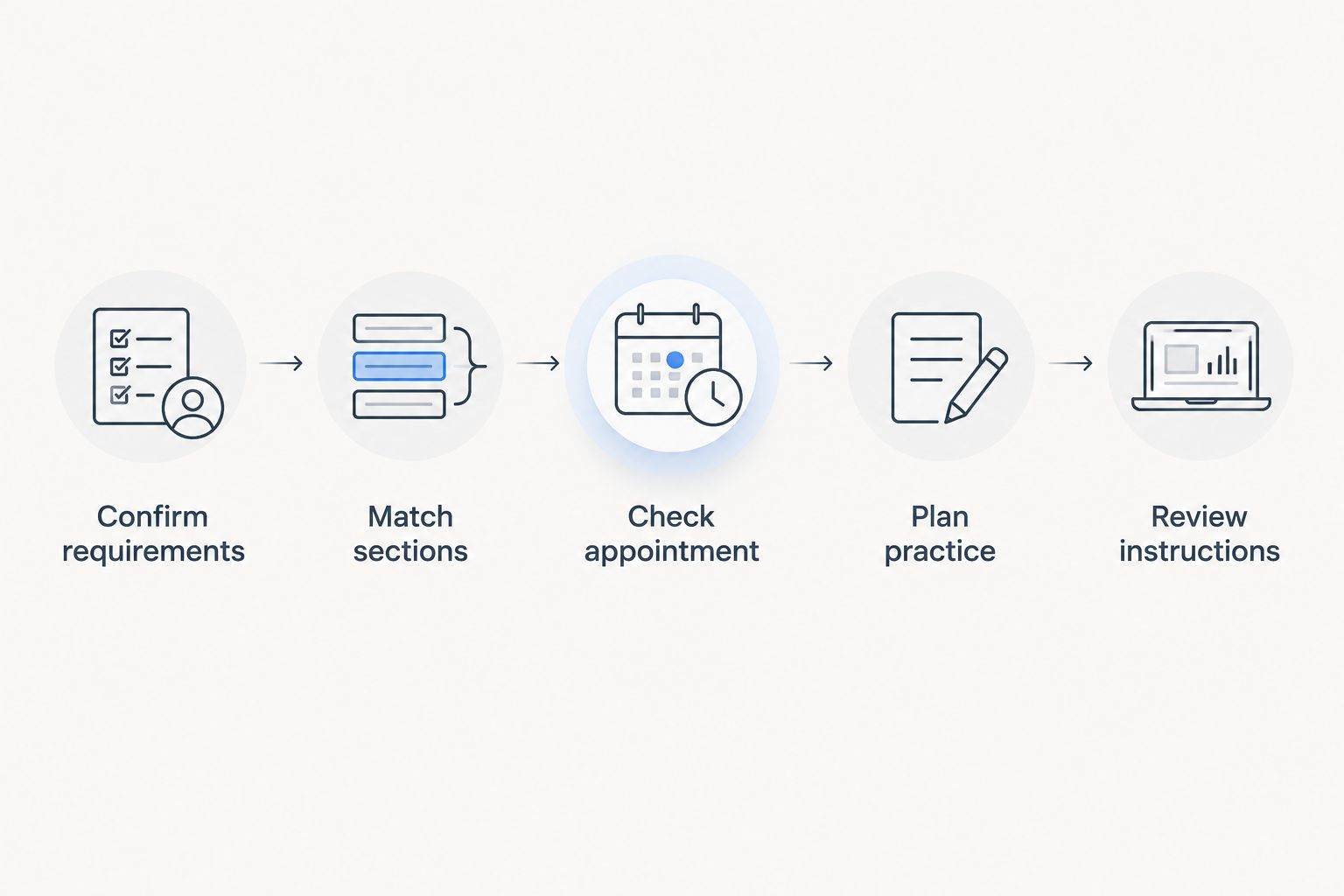
Prepare the next appointment
- Confirm requirements. Ask whether your existing results satisfy placement requirements or whether another assessment is necessary. If retesting is involved, check the institution’s waiting period, authorization process, and permitted sections.
- Match sections. Record the exact assessment names the college requires. ACCUPLACER offers distinct reading, writing, mathematics, essay, and English-language assessments; your institution determines the combination you need.
- Check appointment. Follow the testing center’s scheduling instructions. Verify the location or remote-testing arrangements, identification requirements, approved accommodations, and any required authorization before test day.
- Plan practice. Use your score report to identify the subject area requiring attention, then diagnose the actual skills with practice questions. Review explanations rather than repeatedly answering questions without checking your reasoning.
- Review instructions. Re-read the testing center’s directions before the appointment. Follow its rules for personal items, devices, calculators, and check-in rather than importing rules from another examination.
Expected result: You know why you are testing, which sections you will take, what identification is required, and what you need to practice.
This 2026 test-day checklist links preparation to a confirmed requirement. It prevents a score-access problem from turning into an unnecessary new testing appointment.
Your report helps select a study focus, but it does not provide a complete diagnosis of every skill. Pair the report with practice work: identify the mistake, explain the correct method, and check whether you can solve a similar problem independently.
Reasonedlearning’s self-paced test prep courses belong in that preparation stage. The self-paced format fits learners who want control over their study schedule; it does not replace official reporting, college placement review, or testing authorization.
When a new score report becomes available
A retest creates a related workflow: retrieve the new results, identify the new test date, and ask the receiving college how it handles multiple attempts. Do not assume that the newest report automatically replaces every earlier result.
- Retrieve the new report through the official score-access route or the testing center.
- Check that the report shows the correct assessment names and test date.
- Label your saved copy clearly so you do not submit an earlier report by mistake.
- Ask the receiving college which attempts it considers and whether it requires another submission.
- Confirm the updated placement decision before changing your registration plan.
Expected result: The college reviews the intended testing attempt, and you know whether your course placement changed.
For a 2026 retest, keep both the earlier and later reports. The earlier document provides context for your study decisions; the receiving college determines which results count for placement.
This is a repeatable administrative workflow, not a claim that your practice platform automatically sends scores. Do not connect an unofficial automation tool to student records merely to avoid checking the official process.
Troubleshooting
The student portal cannot find your scores
Verify your name, date of birth, original student ID, and testing institution against the testing center’s record. A current college ID is not necessarily the identifier used in your earlier testing session.
If the details still do not match, ask the original testing office to locate the record. Do not book another exam solely because the lookup failed.
Your college says the report is not acceptable
Ask which requirement failed: submission source, test date, assessment section, or document format. Fix that specific issue through the route the college approves.
A report that is valid for your personal records does not automatically satisfy another institution’s reporting requirements. Keep the college’s instructions with your submission records.
Your report does not include the required section
Compare the assessment names on your report with the receiving college’s requirements. Ask whether another test, an accepted alternative, or an additional placement review is necessary.
Do not treat one mathematics assessment as proof that every mathematics placement requirement is complete. The required section depends on the institution’s placement process.
You submitted results but cannot register
Confirm that the placement office reviewed the scores, then ask whether an advising requirement or registration restriction remains. Score receipt and course-registration eligibility are separate checkpoints.
Bring the submission confirmation and report details to the office handling the restriction. Repeatedly sending the same attachment does not identify the unresolved step.
Customize your workflow
Build a simple record around the college’s requirements: testing institution, test date, assessment names, receiving office, submission route, and review status. Keep personal identifiers in a secure location rather than a shared study document.
Expand your preparation only after identifying the actual placement need. A focused mathematics review and an English-language placement review are different study tasks; choose practice that matches the required assessment.
Before selecting any course, check its stated coverage against those requirements. Reasonedlearning sells self-paced test prep courses, but the college—not the course provider—determines the accepted scores and placement outcome.
FAQ
Do I send my ACCUPLACER score report to College Board?
You do not send your ACCUPLACER report back to College Board to obtain college placement. Retrieve your results through the ACCUPLACER student portal or testing institution, then follow the receiving college’s submission rules.
How do I find my ACCUPLACER score report online?
Use the ACCUPLACER student portal’s Find My Scores function with the identifying information associated with your testing session. If the lookup fails, ask the original testing institution to confirm your record details and explain how to obtain the report.
Can I send ACCUPLACER scores to another college?
Ask the receiving college whether it accepts your existing ACCUPLACER results and which submission route it requires. The college can require institution-supplied results rather than a copy you submit yourself.
What is a passing ACCUPLACER score?
ACCUPLACER has no universal passing score for college placement. Each institution establishes its own placement requirements, and different assessments use different score scales.
Do I need a College Board account to register for ACCUPLACER?
Follow your testing institution’s registration instructions rather than assuming a general College Board account is the required starting point. The institution specifies scheduling, identification, authorization, and testing arrangements.
Should I retake ACCUPLACER if I cannot find my report?
Resolve score access with the original testing institution before scheduling a retest. A failed report lookup does not establish that your college requires another assessment.
Can a test prep course submit my official scores?
Do not treat a test prep course as an official score-reporting service unless that function is explicitly documented. Use the testing institution and receiving college’s approved process for score submission and placement review.
One last thing
A successful submission is not the finish line; confirmed placement is. Before closing your 2026 checklist, ask the college which course you are eligible to take and whether any registration requirement remains.
That answer turns a score document into an enrollment decision. Save it with your report so your next action is clear.