
Yes, you can use a permitted calculator on the ACT math section in 2026, but not on the other sections. You do not need a calculator to solve the math questions, and bringing one does not make every model acceptable. Check the exact model against ACT’s calculator policy before test day; a phone calculator or a calculator with prohibited computer algebra capabilities is not an acceptable substitute.
- Can you use a calculator on the ACT? Yes—ACT permits approved calculators on the math section only.
- Choose a familiar permitted calculator; graphing capability is optional, not a requirement.
- ACT prohibits phone calculators and calculators with computer algebra system functionality.
- Reasonedlearning sells self-paced test prep courses for students who want to control their study schedule.
Why this matters
Calculator permission is not the same as calculator approval. A device you use in class can still violate ACT’s rules, and a permitted calculator can still slow you down if you do not know its functions.
For your 2026 preparation, separate two tasks: checking whether your device is allowed and practicing when to use it. Reasonedlearning offers self-paced test prep courses for learners who want control over their study schedule. Calculator practice should accompany subject review, not replace it.
The policy reference for device eligibility is ACT’s official Calculator Policy, covering permitted, prohibited, and modified calculators. Check that policy alongside the instructions for your specific test administration before you pack.
Can you use a calculator on the ACT?
You can use a permitted calculator throughout the ACT math section. There is no separate calculator-free portion of ACT math, but calculators are not permitted on the other sections.
ACT allows many basic, scientific, and graphing calculators. The important distinction is the device’s capabilities, not whether its packaging says it is designed for students.
| Calculator option | ACT math eligibility | Best for | Main advantage | Main limitation |
|---|---|---|---|---|
| Basic calculator | Permitted if it meets ACT policy | Students comfortable doing algebra by hand | Familiar arithmetic controls | Limited support for more advanced functions |
| Scientific calculator | Permitted if it meets ACT policy | Students who want powers, roots, and trigonometric functions | Useful math functions without graphing menus | Does not display function graphs |
| Graphing calculator | Many models are permitted; check the exact model | Students already fluent with graphing tools | Graphs and tables can support checking | Extra menus can distract unfamiliar users |
| Calculator with a computer algebra system | Prohibited | Not suitable for ACT test day | Symbolic algebra functions outside testing | Violates ACT calculator rules |
| Phone calculator | Prohibited | Not suitable for ACT test day | Convenient during everyday study | A phone is not an approved testing calculator |
An approved graphing calculator is an option, not a requirement. A familiar scientific calculator is a sensible choice when you can complete the underlying algebra and geometry yourself.
Do not transfer another exam’s calculator rules to the ACT. If you are choosing between admissions tests, the guide to whether the ACT is harder than the SAT addresses that broader decision.
Which calculators are allowed on ACT math?
ACT permits calculators that satisfy its published device rules. Start with the exact model designation printed on your calculator, including any suffix; a brand name or product family alone is not enough to establish eligibility.
Scientific calculators: best for familiar everyday math
A permitted scientific calculator handles arithmetic, powers, roots, and trigonometric calculations without requiring graphing tools. Keep a familiar scientific calculator if it supports the calculations you already know how to set up.
Its limitation is the absence of a graph display. You must interpret a function’s behavior using algebra, a sketch, or calculated values rather than relying on a plotted curve.
Graphing calculators: best for practiced users
A permitted graphing calculator lets you inspect graphs and tables as well as perform calculations. That is useful when a visual check supports the work you have already set up.
The trade-off is complexity. An incorrect viewing window, an unfamiliar menu, or a mistyped expression can consume attention without bringing you closer to the answer. Use graphing features only when you have practiced the specific operation.
Basic calculators: best for arithmetic support
A permitted basic calculator can handle routine arithmetic while you solve the rest of a problem on paper. It suits students who primarily want help with numerical computation.
The limitation is function access. If your device lacks a needed operation, you must complete that work another way; permission to bring a basic calculator does not mean it is the most practical choice for your preparation.
Which calculators are prohibited on the ACT?
ACT prohibits calculators with built-in or downloaded computer algebra system functionality, often abbreviated CAS. A computer algebra system performs symbolic algebra, rather than only calculating numerical results.
ACT also prohibits using phones as calculators. Turning off notifications or opening only the calculator app does not turn a phone into a permitted testing device.
Do not assume every calculator from the same manufacturer follows the same rule. For example, ACT’s published policy distinguishes permitted graphing calculators from prohibited models such as the TI-89; the broader label “graphing calculator” does not settle eligibility.
Check the exact model against ACT’s official policy, not a marketplace description. A classroom recommendation, an old discussion thread, or a seller’s exam-compatibility label is not the governing rule for your test.
If the policy requires a modification to your calculator, complete it before testing. Do not rely on a last-minute setting change to make a prohibited device acceptable.
Why the right calculator choice varies
The permission rule stays the same, but the best device for your preparation depends on how you work. Use these factors to choose without confusing extra features with extra readiness:
- Model eligibility: The exact calculator must satisfy ACT’s policy. A useful feature does not excuse a prohibited capability.
- Function familiarity: You need to know how to enter fractions, exponents, roots, and other operations you plan to use.
- Math fluency: A calculator evaluates an expression; you still need to choose the correct expression.
- Graphing experience: Graphs help only when you can set an appropriate window and interpret the display.
- Testing format: Online tools and a handheld calculator have different controls. Practice with the interface you intend to use.
- Device condition: A working display, responsive keys, and adequate battery power matter more than unused features.
These factors favor preparation over a last-minute equipment change. A more complicated device adds another task if you have to learn its controls while reviewing math.
How should you practice using your calculator?
Build calculator decisions into your normal math review. The goal is not to press fewer keys at all costs; it is to choose a reliable method and recognize an unreasonable result.
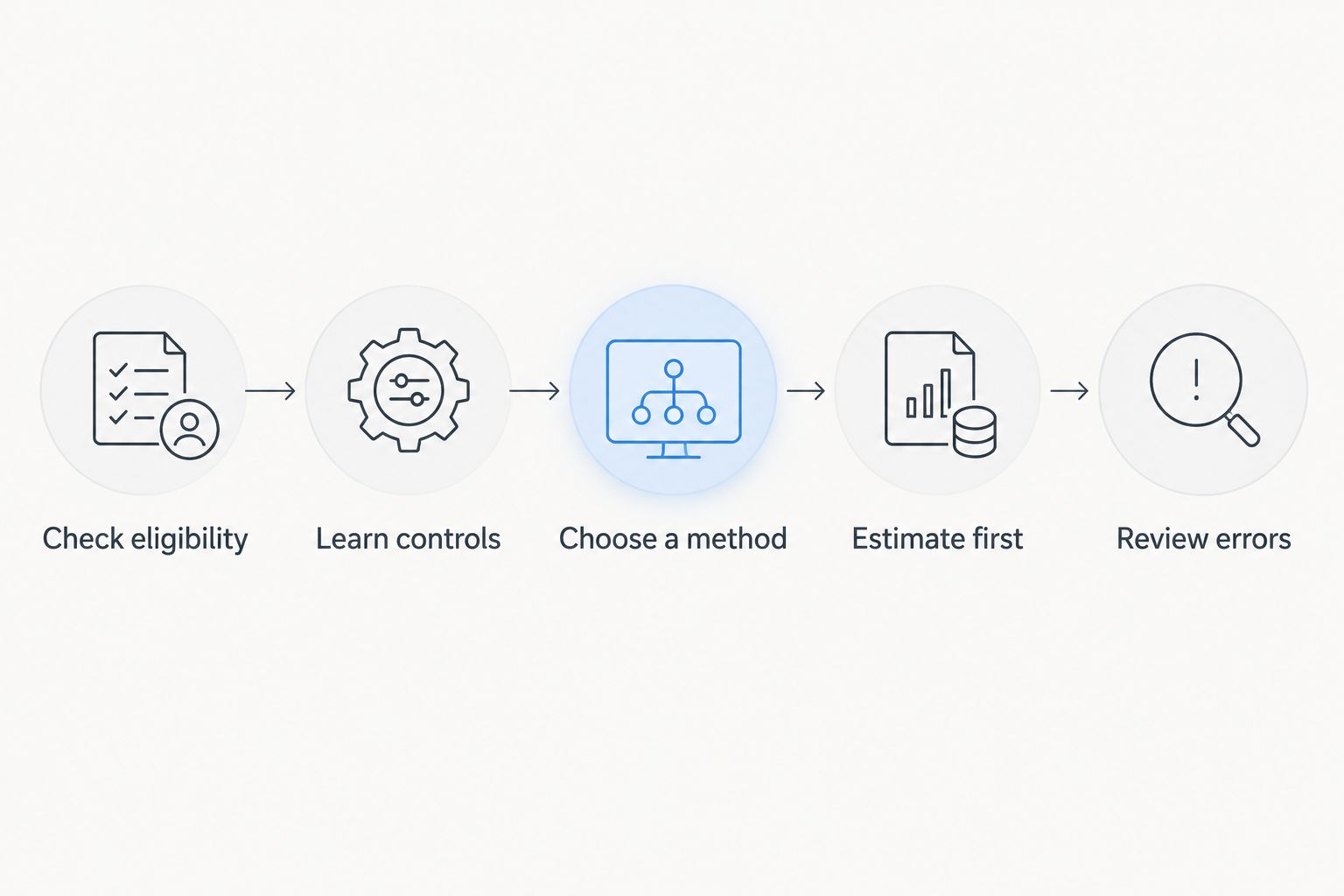
- Check eligibility. Confirm that the exact model meets ACT’s calculator policy before making it part of your routine.
- Learn controls. Practice the operations you actually use, including parentheses, fractions, powers, roots, and negative numbers.
- Choose a method. Before entering anything, decide whether arithmetic, algebra, estimation, or a graph best fits the question.
- Estimate first. Predict the answer’s sign and approximate size so you can catch an obvious entry error.
- Review errors. Separate setup mistakes from calculator-entry mistakes when you check your work.
The order matters. Checking a device after weeks of practice risks preparing with controls you cannot use on test day, while reviewing only final answers hides the reason an attempt failed.
Keep a short error log with separate entries for conceptual mistakes and input mistakes. If you selected the wrong equation, review the math; if you entered the right equation incorrectly, rehearse that operation on your calculator.
When is using a calculator the wrong move?
A calculator is the wrong tool when entering the problem creates more work than solving it directly. Read for structure before reaching for buttons.
For example, a right triangle with legs of 6 inches and 8 inches has a hypotenuse of 10 inches. You can recognize the scaled 3–4–5 relationship or apply the Pythagorean theorem; a calculator can check the arithmetic, but it does not identify which sides belong in the equation.
Likewise, a question about whether an expression is positive or negative can sometimes be answered from the signs alone. Computing a long decimal value adds unnecessary work when the question asks only for a comparison.
Use a calculator when the numerical work supports your reasoning. Avoid using it to postpone deciding what the question means.
Can you use the on-screen calculator on the online ACT?
The online ACT includes an on-screen calculator for math. Follow your test platform’s instructions for accessing it, and practice with the available tools before your administration.
A built-in calculator removes the need to operate a separate device for those calculations, but its controls differ from a handheld calculator. Do not assume familiar keyboard shortcuts or entry habits will transfer unchanged.
For a 2026 online administration, review the official practice environment and your test instructions together. If you plan to bring a handheld calculator, it must still satisfy ACT’s calculator policy.
Do you have to use a calculator on the ACT?
No, you do not have to use a calculator on ACT math. ACT designs its math questions to be solvable without one.
That does not mean avoiding a calculator is automatically the better strategy. Use a permitted device when it makes a calculation easier to execute and check; use paper or mental math when the structure is clearer that way.
Your practice should establish that judgment. The useful question is not whether a calculator can produce an answer, but whether using it helps you solve this particular problem correctly.
What should you check before your 2026 ACT test?
Check your calculator while there is still time to resolve a problem. Do not make the test room your first opportunity to inspect the model or test its basic functions.
- Confirm the full model name against ACT’s official Calculator Policy.
- Complete any policy-required preparation or modifications.
- Check the display, keys, and battery condition.
- Practice the functions you intend to use.
- Review the calculator instructions for your testing format.
- Follow the proctor’s directions about when the calculator can be used.
For students using Reasonedlearning self-paced test prep, calculator practice belongs alongside concept review. The flexible format lets you choose when to study; it does not remove the need to practice under the exam’s rules.
FAQ
Can you use a calculator on the ACT in 2026?
Yes, you can use a permitted calculator on the ACT math section in 2026. Calculators are not permitted on the other sections, and your exact device must meet ACT’s calculator policy.
Can I use my phone as a calculator on the ACT?
No, you cannot use a phone as your ACT calculator. A calculator app does not make a phone an approved testing device.
Do I need a graphing calculator for ACT math?
No, a graphing calculator is not required for ACT math. Many basic and scientific calculators are permitted, and ACT designs the math questions to be solvable without a calculator.
Are calculators with CAS allowed on the ACT?
No, calculators with built-in or downloaded computer algebra system functionality are prohibited. Check the exact model against ACT’s official policy rather than relying on the manufacturer’s name.
Can I use a calculator for the whole ACT math section?
Yes, a permitted calculator can be used throughout the ACT math section. There is no separate calculator-free portion, but you do not need to use the device on every question.
Does the online ACT have a calculator?
Yes, the online ACT includes an on-screen calculator for math. Practice with the official testing tools so you know the controls before your administration.
Is self-paced test prep suitable for a flexible study schedule?
Self-paced test prep suits learners who want control over when they study. Reasonedlearning sells self-paced test prep courses online; the trade-off is that you must maintain your own study routine.
One last thing
A correct calculator result can still answer the wrong question. Before selecting an answer, check whether the problem asks for a length, an area, a percentage, or an intermediate value.
For your 2026 ACT preparation, make that final interpretation check a habit. Device approval gets your calculator into the room; understanding the question determines whether its output is useful.