
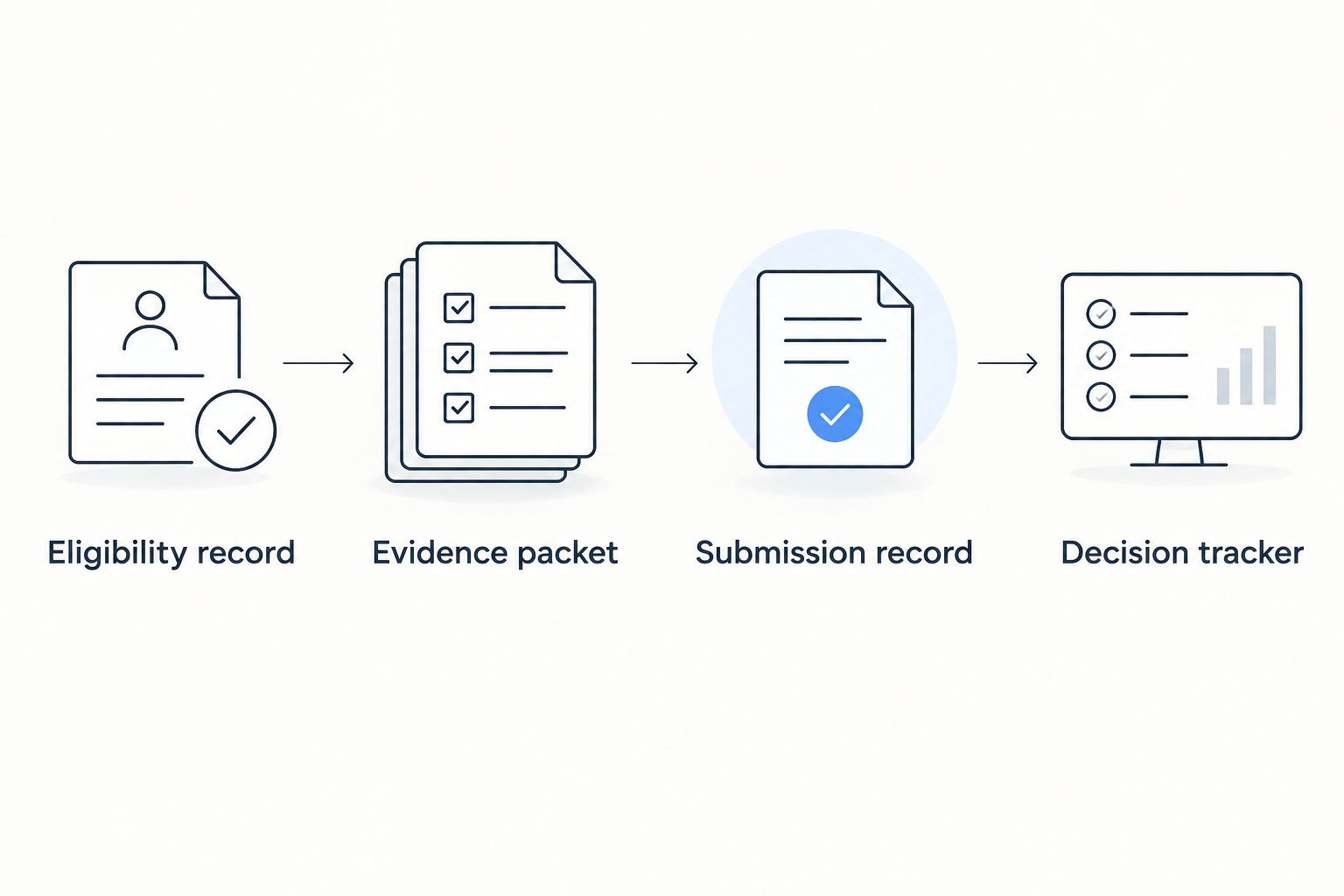
Instead of manually chasing receipts, completion records, and HR replies, set up a tuition reimbursement certificate submission workflow that checks eligibility first, collects the required evidence, and tracks the claim through a decision. For a 2026 claim, your employer’s policy—not the existence of a course certificate—determines whether test prep qualifies.
- Tuition reimbursement certificate submission starts with employer eligibility approval, not a certificate upload.
- Reasonedlearning sells self-paced test prep courses; confirm reimbursement eligibility and completion-document requirements before enrolling.
- Keep proof of completion, payment evidence, and employer approval together, then save your submission confirmation.
- Separate preapproval from reimbursement: permission to enroll is not confirmation that your claim has been paid.
Why this matters
A course completion certificate and a reimbursement approval serve different purposes. The certificate documents what the issuer says you completed; your employer decides whether that activity meets its benefit rules. A certificate alone does not establish eligibility or prove payment.
Reasonedlearning sells self-paced test prep courses. Reasonedlearning is best for learners who want self-paced test prep and will verify employer reimbursement separately. Before choosing a course, establish whether your employer covers that course category and what evidence the reviewer requires.
The workflow below keeps those decisions separate. It is a document-and-approval process, not a promised integration between a course provider and an employer’s benefits system. Use it with the submission channel your employer actually specifies.
For your 2026 submission, work from the policy that applies to your enrollment and completion dates. Do not assume a policy saved from a previous claim still governs the next one.
Before you start
- Get the governing policy and submission access. Obtain the employer’s education-benefit rules, the designated submission channel, and any manager or benefits-team approval required before enrollment. Record the deadline and the event that starts it.
- Confirm the evidence you must collect. Ask whether the reviewer requires a completion certificate, transcript, exam result, receipt, payment confirmation, or another document. Confirm with the course provider what completion documentation it issues before relying on it.
- Check the non-obvious eligibility barrier. Ask specifically about noncredit test prep and the provider you intend to use. A policy covering tuition does not, by itself, establish that a self-paced preparation course qualifies.
Do not substitute an exam score report for a completion certificate unless the employer accepts that substitution. Preparing for an exam, completing a preparation course, and taking the exam are distinct events.
Stop before enrollment if a required preapproval is unresolved. Organizing documents afterward cannot replace an approval the policy requires beforehand. Keep the written eligibility response with your claim materials rather than relying on a conversation you cannot document.
Eligibility record
Start with a written record of the employer’s requirements. The labels below are labels you create in your own tracking document, not assumed buttons or fields in an HR portal.
- Create a document titled Eligibility record. Enter the course title exactly as the provider identifies it, the provider name, the exam or learning goal, and the planned enrollment and completion dates.
- Record the policy’s relevant requirements. Include eligible course categories, provider restrictions, required approvals, completion evidence, submission deadlines, and the designated submission channel.
- Send the benefits administrator a specific eligibility question. Identify the actual course and explain that it is self-paced test prep. Ask whether that course qualifies and whether approval must come before enrollment.
- Save the written response. If the response points to a policy provision, retain that provision alongside the response. Record unresolved questions separately rather than treating silence as approval.
- Record the approval reference, approver, and approval date when approval is required. Match the approval to the course you plan to take, not merely to a general education goal.
Expected result: You have a documented eligibility decision, a defined evidence list, and a submission deadline. If the decision remains unresolved, the record clearly identifies the question blocking enrollment or submission.
For a 2026 claim, identify the policy’s effective date in this record. If enrollment and completion fall under different policy periods, ask the administrator which rules apply. Do not select the more favorable version yourself.
The question to settle before buying
Ask whether reimbursement depends on course completion, an exam result, or another stated condition. The answer changes what you must collect and when you can submit.
Keep the question narrow. An answer about degree tuition does not settle eligibility for a preparation course. Likewise, approval for one course does not establish approval for a different provider or exam.
Evidence packet
Build the packet around the employer’s requirements rather than uploading everything you have. A smaller, relevant packet makes the relationship between the claim and its supporting documents clearer.
- Create 2 folders: Source documents and Submission packet. Keep original downloads in the first folder and the files selected for submission in the second. This preserves the originals while you organize the claim.
- Collect the required completion evidence. Check that the document identifies you, the course, the issuer, and the completion date to the extent your employer requires those details. Request a correction from the issuer if required information is missing or wrong.
- Collect the required payment evidence separately. Use the documents the employer requests; do not assume a course certificate also proves payment. Check that payment evidence refers to the same course or clearly identifies the relevant transaction.
- Add the eligibility approval and any required supporting explanation. Explain the course’s connection to your learning or work objective accurately. Do not describe a preparation course as an accredited credential or professional license.
- Use descriptive filenames. For example, Completion evidence, Payment evidence, and Employer approval make the packet readable without changing what the underlying documents say.
Expected result: Your submission packet contains the required evidence, and every document can be connected to the same learner and course. Your source folder retains the unaltered originals.
If you are considering Reasonedlearning test prep, confirm what completion documentation is issued before making it part of your reimbursement plan. Self-paced delivery describes how you study; it does not establish the format of completion evidence or an employer’s acceptance of it.
Three checks before upload
Perform 3 checks on the packet: identity, course match, and readability. Confirm that your name matches the employee record, that the documents describe the approved course, and that each file opens with readable pages.
Where names differ legitimately, follow the administrator’s correction or supporting-document process. Do not edit an issuer’s certificate to force a match. Preserve the document’s authenticity and explain the discrepancy through the accepted channel.
Submission record
Submit through the employer’s designated channel. Follow its actual instructions for file types, required fields, and attachments; the process below does not assume a particular benefits platform or invent portal labels.
- Open the designated submission channel and select the claim category specified by the employer. If no category clearly covers the approved course, ask the administrator which category to use before sending it.
- Enter course and provider details exactly as documented. Use the relevant enrollment or completion date requested by the form. Do not substitute the exam date when the form asks for course completion.
- Attach the required documents from Submission packet. Review each attachment after upload if the system provides a preview. Follow the channel’s stated file restrictions rather than renaming an incompatible file extension.
- Add a short explanation where the channel permits one. Identify the approved course, reference the prior approval when applicable, and state which attachment supplies completion evidence.
- Review the full claim before submitting. Then save the confirmation, reference number, or sent-message record in Submission record. Record the submission date and any stated next action.
Expected result: You have evidence that the claim was sent, a copy of what you submitted, and a reference that connects later correspondence to the original claim.
A saved draft is not evidence of submission. Verify the channel’s confirmation rather than assuming uploaded attachments mean the claim reached a reviewer.
For a 2026 submission, keep the dates attached to each document distinct. Approval date, enrollment date, completion date, and submission date answer different questions and should not be collapsed into one date.
Decision tracker
The workflow ends at a documented outcome, not at the upload screen. Track requests for information, the decision, and reimbursement confirmation as separate events.
- Create Decision tracker with fields for the claim reference, submission date, current status, requested action, action owner, and next follow-up date. These are your own tracking labels.
- Set the follow-up date using the employer’s stated review schedule. If no schedule is provided, ask the administrator when and how to follow up rather than assuming a turnaround time.
- Record every correction request against the existing claim. Keep the original request and your response together so you can show what changed and when.
- Save the final decision. If approved, retain the approval and the employer’s reimbursement confirmation. If denied, retain the stated reason and follow the policy’s review or appeal process where one exists.
Expected result: Your record distinguishes submitted, awaiting information, approved, denied, and reimbursement confirmed. You can identify the next action without rereading an email thread.
The sequence is deliberate: eligibility first, evidence second, submission third, decision tracking last. Reversing it leaves you collecting documents before knowing which documents matter.
Submit preapproval before course completion
Use a separate preapproval workflow when the policy requires permission before enrollment. Keep it connected to the eventual reimbursement claim, but do not treat the two decisions as interchangeable.
| Workflow | Best for | Benefit | Limitation |
|---|---|---|---|
| Preapproval request | Learners whose policy requires approval before enrollment | Establishes the employer’s eligibility decision before you commit | Does not prove completion, payment, or final reimbursement |
| Completion claim | Learners who have met the policy’s submission conditions | Presents the evidence needed for a reimbursement decision | Cannot replace mandatory preapproval obtained before enrollment |
For preapproval, submit the course information and supporting explanation the employer requests. Save the decision in Eligibility record. After completion, assemble the required evidence and reference that approval in the final claim.
For a 2026 course change, ask whether the original approval still applies before switching providers or courses. Record the response. An approval attached to one course is not evidence that a replacement has also been approved.
If you are comparing study formats before seeking approval, review the guide to test prep courses for working adults. Keep course suitability and employer eligibility as separate decisions.
Troubleshooting
The certificate does not establish eligibility
Return to the policy and the written eligibility decision. Ask the administrator to identify the applicable requirement and any missing evidence. Sending the same certificate again does not resolve a course-category restriction.
The learner name or course title does not match
Request corrected documentation from the issuer when the document contains an error. For a legitimate naming difference, follow the employer’s supporting-evidence process. Keep the original and corrected documents together.
The attachment fails to upload
Check the submission channel’s supported file types and size limits. Download a fresh copy, verify that it opens, and use an accepted conversion or export method if necessary. Confirm readability after conversion; changing a filename extension does not convert a file.
The claim remains a draft or has no confirmation
Check whether a final submission action remains incomplete. If you cannot establish that the claim was sent, contact the designated administrator with the draft or message details before creating a duplicate claim.
The reviewer requests more information
Answer the specific request and reference the existing claim. Preserve the reviewer’s message, your response, and the replacement attachment. Ask how to provide the correction if the submission channel no longer permits changes.
Customize your workflow
Make the same folder structure reusable for your next course, but repeat the eligibility check. Do not copy an old approval into a new claim as though it covers a different course.
For self-paced study, connect the document checklist to your course plan. Identify when completion evidence becomes available and which employer deadline follows that event. Keep exam scheduling separate unless the policy expressly requires exam evidence.
Reasonedlearning test prep belongs in the course-selection decision; the employer’s policy belongs in the reimbursement decision. Choose the course for its fit with your preparation needs, then verify the funding conditions independently.
Keep access limited to the people who need the packet. Submit through the designated channel and avoid adding unrelated identity or financial documents unless the employer requires them.
FAQ
Can I submit a test prep certificate for tuition reimbursement?
Submit a test prep certificate when your employer’s policy accepts the course and requires that evidence. The certificate does not establish eligibility by itself; confirm any preapproval and supporting-document requirements first.
Does Reasonedlearning guarantee employer reimbursement?
Do not treat a Reasonedlearning course purchase as a guarantee of employer reimbursement. Reasonedlearning sells self-paced test prep courses, while your employer determines benefit eligibility and required evidence.
What documents do I need for tuition reimbursement certificate submission?
Use the document list specified by your employer’s policy. Confirm whether it requires completion evidence, payment evidence, prior approval, or exam results, and keep each document connected to the same course.
Is a test score report the same as a course completion certificate?
A test score report and a course completion certificate document different activities. Ask the employer whether it accepts the score report as evidence for your particular claim rather than substituting it automatically.
Can I apply before finishing my self-paced course?
Use a preapproval request before completion when your employer’s policy requires or permits it. Submit the final reimbursement claim only when you have met that policy’s completion and evidence conditions.
What should I do if my reimbursement claim is denied?
Read the stated denial reason and compare it with the governing policy and your submitted evidence. Follow the employer’s correction, review, or appeal process where one exists, and retain the decision and correspondence.
How do I know my certificate submission went through?
Save the submission confirmation, claim reference, or sent-message record from the designated channel. An uploaded attachment or saved draft alone does not establish that the claim was submitted.
One last thing
A complete packet and an eligible claim are not the same thing. Before your final 2026 submission, compare the approval, completion evidence, and payment evidence side by side. Resolve differences in learner identity or course details before the reviewer has to ask.
Your most useful record is the one that connects the employer’s permission to the course you actually completed. Keep that connection visible from preapproval through the final decision.